Canceling Netflix in the United States is straightforward when you use the account that pays for the membership. Most people finish in a couple of minutes from a browser. The sections below cover website cancelation, app/TV limits, Apple/Google/Amazon billing, and what to do if a charge still posts.
US searches cluster around how to cancel Netflix and cancel Netflix subscription. Use the website path first — it works even when the TV app only shows “Manage membership” deep links.
How to cancel Netflix subscription on the website
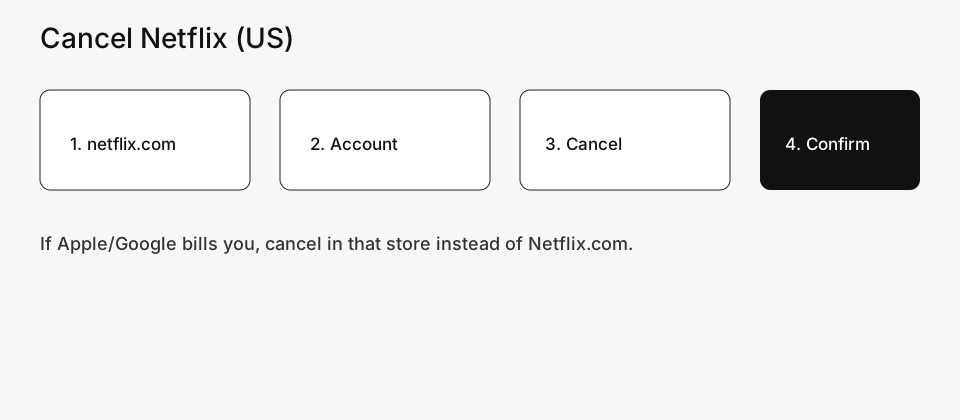
- Sign in at netflix.com → Account.
- Open Membership & Billing → Cancel Membership.
- Confirm. You keep access until the end of the paid period in most US plans.
- Save the confirmation email or screenshot the cancel date.
How to cancel Netflix on phone or smart TV
Phone browsers can use the same netflix.com account page. Many smart TV apps only open a QR / “manage on phone” screen — finish cancel on the website so billing actually stops.
Cancel Netflix billed by Apple, Google Play, or Amazon
If Netflix never charged your card directly, cancel in the store that owns the subscription (Apple Subscriptions, Google Play → Payments & subscriptions, or Amazon Memberships). Canceling only inside Netflix settings will not stop those renewals.
Still charged after you canceled Netflix
- Identify the statement descriptor and billing channel.
- Compare charge date vs your cancel confirmation.
- Request a refund from that billing channel first.
- If needed, dispute the charge with your bank using the cancel proof.
How to cancel Netflix subscription (US). Cancel Netflix in the United States on web or mobile, see when billing stops, and what happens to downloads and profiles.
Cancel Netflix on the website (recommended)
- Open a browser and go to netflix.com. Sign in with the owner email or phone number—the one on your bank or PayPal statement.
- Select your profile if asked, then open the account menu and choose Account.
- Find Membership, Plan details, or Cancel membership (labels rotate).
- Choose Cancel Membership, confirm, and wait for the on-screen confirmation.
- Check email for a cancelation message or screenshot the status showing you will lose access on a specific date.
Will I lose Netflix immediately?
Usually no. Netflix keeps working until the end of the period you already paid for. After that date it should not renew. If you restart before the end date, billing rules follow Netflix’s current restart policy.
Cancel from a phone app or smart TV
- Many phone apps hide cancelation or only deep-link to a browser page.
- Smart TV apps almost never complete cancelation. Use a phone or computer browser instead.
- If Netflix was added by a mobile carrier “plus” plan, cancel inside the carrier account, not only inside Netflix.
If you subscribed through Apple, Google Play, or Amazon
When the store owns billing, Netflix’s site may say you must cancel with that store.
- Apple: iPhone/iPad Settings → your name → Subscriptions → Netflix → Cancel Subscription.
- Google Play: Play Store → profile → Payments & subscriptions → Subscriptions → Netflix → Cancel.
- Amazon: Amazon account → Memberships and Subscriptions → Netflix → Cancel.
Shared household / extra member confusion
- Only the paying account owner can cancel the membership.
- A profile password is not the same as the account password.
- If someone else pays, they must sign in with their credentials to cancel.
Still charged after you canceled
- Match the charge date to your cancel confirmation date. A charge that posted before cancel is often the current period.
- Confirm which platform billed you (Netflix direct vs Apple/Google/Amazon/PayPal).
- Look for a second Netflix account under another email.
- Contact Netflix billing chat with: cancel confirmation, last four of the card, and statement date.
- If the charge is truly unauthorized after confirmed cancel, open a card or PayPal dispute with your proof.
Related guides on Complaintpage
FAQ
How do I cancel Netflix in the US without the app?
Use any browser at netflix.com → Account → Cancel membership.
Can I cancel Netflix and keep watching until month end?
Yes in most cases—you keep access through the paid period.
Why don’t I see Cancel Membership?
You may be on a profile-only login, a partner-billed plan, or the wrong Microsoft/Apple/Google account. Try the owner login on the website or the store that bills you.
Official reference: Netflix cancel membership help.
Related guides on Complaintpage
More cancel & billing guides
- How to Cancel Amazon Prime (US)
- How to Cancel YouTube TV (US) — Membership, Add-ons & Billing
- How to Cancel Xbox Game Pass (US) — Console, PC & App Store
- How to Cancel HelloFresh (US) — Skip, Pause & Full Cancel
- TD Bank Credit Card Dispute (US) — Steps & Evidence Checklist
- U.S. Bank Credit Card Dispute (US) — How to File Online
Cancel Google Play subscription
Also covers: searches like “how to cancel netflix membership us” — same cancel/dispute path for most users.
United States — practical steps for “Cancel Netflix (US) — Keep Profile Data, Stop Billing”. Not legal advice; menus change.
Treat this as a one-sitting checklist: find the biller, stop renewals, capture the end date.
Do this in order for Netflix
- Sign in with the email tied to the charge (check spam for receipts).
- Open billing / membership / dispute and follow labels for Netflix.
- Choose a reason that matches facts — unauthorized, cancelled still billed, not received, etc.
- Confirm, then capture the success screen and any case ID.
- Note the next renewal or decision date on your calendar.
- Netflix often keeps access until the paid period ends; watch the end date.
Why the website cancel did nothing
If billed by Apple, Google Play, or a mobile carrier bundle, cancel there too.
iPhone path: Settings → your name → Subscriptions. Google Play: profile → Payments & subscriptions. PayPal: Settings → Payments → Automatic payments. Carrier or retail bundles need the partner login.
If you only deleted the app, billing usually continues.
Wrap-up checklist
- Correct billing channel handled
- Confirmation saved
- Next date noted
- Apple/Google/PayPal checked
- Timeline ready if escalating in United States
Netflix cancel confirmation email missing
Local escalation options (United States)
cooling-off is limited; focus on merchant policy + bank windows
If the merchant process fails, look at CFPB complaint portal and your state AG consumer page and keep copies of every reply.
Receipts and dates that matter
- Cancel confirmation email, membership end date, statement descriptor
- Email search: brand name + exact amount
- Chat export or ticket number
- Photos / tracking for returns
- Screenshot of the statement descriptor
- Cancel or claim confirmation page
Still charged after you thought it was cancelled
Check for a second subscription under another email. Check Apple/Google/PayPal again. Ask the merchant for a written cancel confirmation. If money keeps leaving, use your card issuer dispute / provisional credit rules with the evidence packet.
How long billing usually takes to stop
Access often continues until the paid period ends. Bank disputes have filing windows. Marketplace cases have reply clocks. Put the earliest hard deadline on your phone.
Do not do these five things
- Changing the card instead of cancelling
- Missing the family organizer account
- Calling instead of using upload-capable forms
Where to go after a dead-end ticket
- Official Netflix path with confirmation
- Marketplace / PayPal buyer protection if eligible
- Card or bank dispute with uploads
- CFPB complaint portal and your state AG consumer page
Family, shared, and team plans
Only the purchaser or plan owner can usually cancel. Tell household members before you cut renewals so nobody loses access mid-month without warning.
Quick clarifications
Can I get a partial refund?
Policy-dependent. Ask once in writing with cancel proof and the charge IDs.
I cannot find the subscription.
Check other emails, PayPal, Apple/Google accounts on every device, and carrier bills.
App cancel or website?
Prefer the channel that shows a case ID and lets you download confirmations.
Trial converted overnight — now what?
Cancel renewals immediately, request a goodwill refund with the trial end screenshot.
How long until billing stops?
Usually after the paid period if auto-renew is off — confirm the end date in-account.
Matching the charge to Netflix
Processors rename brands. Search mail for the charge amount and date, then match Netflix receipts before you open a dispute.
Top US billing & dispute guides
Start here if Google sent you for a specific problem — these are the current priority pages:
Related guides
- Rakuten Cash Back Missing? Track Order & Fix It (US)
- Dispute an Amex Charge Online (US) — Steps & Deadlines
- Capital One Charge Dispute (US) — App & Online Steps
- Open a PayPal Purchase Dispute (US) — Resolution Center
- Cancel PayPal Automatic Payments (US) — Stop Recurring
- Cancel Spotify Premium (US) — App, Apple & Google Play
- Amazon A-to-z Claim (US) — When & How to File
- Cancel Amazon Prime (US) — Membership Settings Path
- Phone Insurance Claim (US) — Carrier Device Protection
- Cancel Disney+ Ireland — Web, iPhone & Google Play
- Hotel Overcharge or Wrong Rate — How to Complain (Ireland)
- Dispute a Credit Card Charge (US) — Bank Steps
- Stop Bank Autopay (US) — ACH & Bill Pay Off
Related US guides: US hub · How to Cancel Spotify Premium in the US — Website, Apple & Google · Cancel PayPal Automatic Payments (US) — Stop Still Charging
Related US guides: US consumer hub · Dispute a credit card charge · Cancel Amazon Prime · Cancel Netflix · Cancel Spotify Premium · Cancel Hulu · Cancel Disney Plus · Cancel YouTube Premium · Cancel ChatGPT Plus · Cancel Apple Music.