- Free trial auto-converted and you need to cancel Amazon Prime before the next renew.
- You canceled a Prime Video channel but the main Prime membership still bills.
- Amazon Household: only the adult who owns Prime can end membership.
- You were billed through Apple or Google Play — Amazon.com cannot stop that store billing.
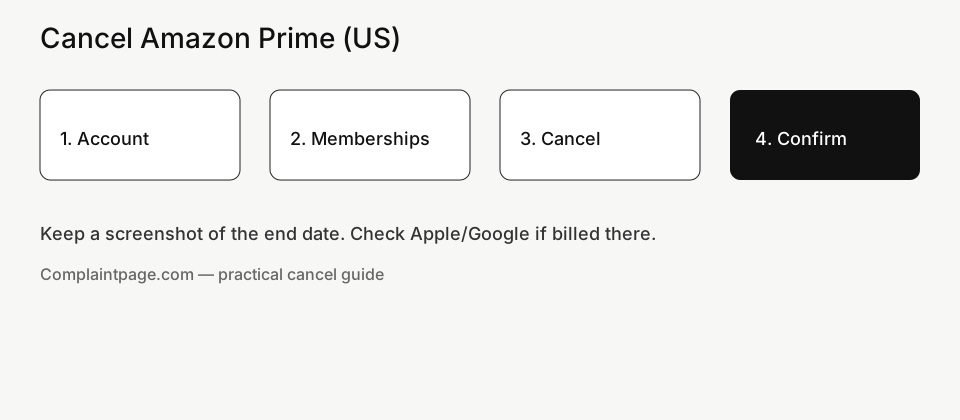
How to cancel Amazon Prime on amazon.com (desktop)
- Open https://www.amazon.com and sign in with the account that pays for Prime.
- Click Account & Lists → Memberships and subscriptions (or search “cancel prime” / open Prime membership).
- Select Prime → Manage membership.
- Choose End membership / cancel / update membership and continue.
- Decline keep-benefits and “switch to monthly” offers if your goal is a full cancel.
- Confirm. Screenshot the page that shows Prime ends on [date] or canceled status. Save the confirmation email.
If the page still shows a future renew date with no end date, cancel did not finish — repeat until the end date appears.
Cancel Amazon Prime (US). Cancel Amazon Prime in the US before the renewal date: desktop and app paths, refund eligibility notes, and how to confirm you are no longer billed.
Cancel Amazon Prime in the mobile app
- Open the Amazon shopping app → profile / Account.
- Tap Amazon Prime / membership settings.
- Manage membership → End membership and confirm.
App “Benefits” or channel screens often look like cancel but do not stop Prime. If the app loops on offers, use a mobile browser on amazon.com or a desktop browser instead.
Apple App Store or Google Play billing
If you started Prime (or a related Amazon subscription) through an App Store / Play trial, cancel in that store’s Subscriptions list. Ending membership only inside Amazon.com will not stop Apple or Google from renewing a store-billed plan.
What ends vs what does not
- Ends with Prime: free/faster shipping benefits, Prime Video included with the membership, and other perks tied to active Prime.
- Does not auto-end: Audible, Kindle Unlimited, paid Live/Channels add-ons, some Music or Games plans, and other items under Memberships and subscriptions. Cancel each separately.
- Prime Visa: Canceling Prime does not close the card; closing the card does not cancel Prime.
Monthly vs annual Prime
Both use the same Manage membership → End membership path. Annual plans sometimes show different retention offers. Switching monthly is not a cancel — decline it if you want out. Ask Amazon the same day about a refund if an annual plan just renewed and you barely used benefits.
Amazon Household and shared shopping
Only the adult who owns the Prime membership can end it. Ending the wrong adult’s settings will not stop the owner’s renewal. Tell household members before you cancel if they rely on two-day shipping.
Confirm cancel and catch a mistaken auto-renew
- Membership page shows canceled / ends on a specific date.
- Confirmation email saved.
- Watch the next card/PayPal statement for another AmazonPrime charge.
Same-day mistaken renew: use the refund / membership help path on the manage page or Help chat with the membership ID. Unused-benefit refunds are more likely when you act immediately. A card dispute is last resort after Amazon’s written response — see our credit card dispute guide. If billed via PayPal, also check PayPal automatic payments.
Rejoin later
You can subscribe again later at then-current pricing. A free trial may not repeat. Do not cancel only to chase a new trial unless you accept that risk.
FAQ — how to cancel Amazon Prime (US)
Will I lose my order history if I cancel Prime?
No. Order history stays with the Amazon account. You lose Prime benefits, not the account.
Does deleting the Amazon app cancel Prime?
No. You must End membership on the website/app membership screens (or cancel in Apple/Google if billed there).
Can I get a refund after a Prime trial converts?
Sometimes, if you ask quickly via Account / chat with the charge date. It is discretionary — not guaranteed.
Does ending Prime cancel Audible or Channels?
No. Cancel those under Memberships and subscriptions separately.
Who can cancel in a shared household?
The Amazon account holder who owns the Prime membership.
Will I keep Prime until the end date?
Usually yes after a confirmed cancel — screenshot that date.
Manually reviewed for U.S. Amazon Prime cancel flow (2026).
Official reference: Amazon Help — Cancel Prime membership.
Related guides on Complaintpage
Also see: Amazon Prime Central.
More cancel & billing guides
- How to Cancel ChatGPT Plus (US) — Website, Apple & Google Play
- How to Cancel Canva Pro (US) — Website, Apple, Google & PayPal
- How to Cancel DoorDash DashPass (US) — App, Web, Apple & Google
- How to Cancel Apple Arcade (US) — iPhone, Mac & account.apple.com
- How to Cancel Discord Nitro (US) — Desktop, Apple & Google Play
US priority: Amex charge dispute · Rakuten missing cash back · Chase dispute timeline · US hub
United States — practical steps for “Cancel Amazon Prime (US) — Membership Settings Path”. Not legal advice; menus change.
Your goal is a dated confirmation, not a vague “we will look into it.”
From login to confirmation (Amazon)
- Sign in with the email tied to the charge (check spam for receipts).
- Open billing / membership / dispute and follow labels for Amazon.
- Choose a reason that matches facts — unauthorized, cancelled still billed, not received, etc.
- Confirm, then capture the success screen and any case ID.
- Note the next renewal or decision date on your calendar.
- Sold by Amazon vs third-party seller changes refund leverage.
Who actually bills Amazon
Prime, Kindle, Audible, and Channel subscriptions are separate cancel paths.
iPhone path: Settings → your name → Subscriptions. Google Play: profile → Payments & subscriptions. PayPal: Settings → Payments → Automatic payments. Carrier or retail bundles need the partner login.
If you only deleted the app, billing usually continues.
Common ways people stall their own case
- Ignoring partner billing
- Disputing the wrong descriptor
- Letting free trials convert unnoticed
Final checklist for Amazon
- Correct billing channel handled
- Confirmation saved
- Next date noted
- Apple/Google/PayPal checked
- Timeline ready if escalating in United States
Amazon partner bundle cancel United States
Searchers asking “Amazon partner bundle cancel United States” usually need the same proof: dated cancel or claim, statement line, and the correct biller. For Amazon in United States, finish the official path first, then escalate with a one-page timeline.
cancel Amazon still charging United States
Re-open every possible biller. Send a short timeline (dates, amounts, case IDs) once — not five emotional essays. Skip cold-call “refund recovery” companies.
For Amazon in United States, compare the statement amount to mail receipts before you dispute the wrong merchant.
Evidence packet that banks respect
- Order ID, return label, A-to-z case ID, chat transcript
- Email search: brand name + exact amount
- Chat export or ticket number
- Photos / tracking for returns
- Screenshot of the statement descriptor
- Cancel or claim confirmation page
Charges after cancel: what to check tonight
Check for a second subscription under another email. Check Apple/Google/PayPal again. Ask the merchant for a written cancel confirmation. If money keeps leaving, use your card issuer dispute / provisional credit rules with the evidence packet.
Amazon cancel keep watching until period ends
Searchers asking “Amazon cancel keep watching until period ends” usually need the same proof: dated cancel or claim, statement line, and the correct biller. For Amazon in United States, finish the official path first, then escalate with a one-page timeline.
cancel Amazon billed by Apple United States
Sold by Amazon vs third-party seller changes refund leverage.
Write one paragraph: what you bought, when you cancelled, what still charged, what you want (stop renewals / refund / both).
Cooling-off and complaint routes (United States)
cooling-off is limited; focus on merchant policy + bank windows
If the merchant process fails, look at CFPB complaint portal and your state AG consumer page and keep copies of every reply.
What “pending” often means
Access often continues until the paid period ends. Bank disputes have filing windows. Marketplace cases have reply clocks. Put the earliest hard deadline on your phone.
When merchant support is not enough
- Official Amazon path with confirmation
- Marketplace / PayPal buyer protection if eligible
- Card or bank dispute with uploads
- CFPB complaint portal and your state AG consumer page
Household billing quirks
Only the purchaser or plan owner can usually cancel. Tell household members before you cut renewals so nobody loses access mid-month without warning.
Descriptor search tips
Processors rename brands. Search mail for the charge amount and date, then match Amazon receipts before you open a dispute.
Edge cases in plain language
App cancel or website?
Prefer the channel that shows a case ID and lets you download confirmations.
Trial converted overnight — now what?
Cancel renewals immediately, request a goodwill refund with the trial end screenshot.
How long until billing stops?
Usually after the paid period if auto-renew is off — confirm the end date in-account.
Can I get a partial refund?
Policy-dependent. Ask once in writing with cancel proof and the charge IDs.
I cannot find the subscription.
Check other emails, PayPal, Apple/Google accounts on every device, and carrier bills.
cancel Amazon billed by Google Play United States
Searchers asking “cancel Amazon billed by Google Play United States” usually need the same proof: dated cancel or claim, statement line, and the correct biller. For Amazon in United States, finish the official path first, then escalate with a one-page timeline.
Amazon cancel confirmation email missing
Searchers asking “Amazon cancel confirmation email missing” usually need the same proof: dated cancel or claim, statement line, and the correct biller. For Amazon in United States, finish the official path first, then escalate with a one-page timeline.
cancel Amazon PayPal automatic payment
Searchers asking “cancel Amazon PayPal automatic payment” usually need the same proof: dated cancel or claim, statement line, and the correct biller. For Amazon in United States, finish the official path first, then escalate with a one-page timeline.
refund after canceling Amazon United States
Searchers asking “refund after canceling Amazon United States” usually need the same proof: dated cancel or claim, statement line, and the correct biller. For Amazon in United States, finish the official path first, then escalate with a one-page timeline.
find forgotten Amazon subscription United States
Searchers asking “find forgotten Amazon subscription United States” usually need the same proof: dated cancel or claim, statement line, and the correct biller. For Amazon in United States, finish the official path first, then escalate with a one-page timeline.
Related guides
- Rakuten Cash Back Missing? Track Order & Fix It (US)
- Dispute an Amex Charge Online (US) — Steps & Deadlines
- Capital One Charge Dispute (US) — App & Online Steps
- Open a PayPal Purchase Dispute (US) — Resolution Center
- Cancel PayPal Automatic Payments (US) — Stop Recurring
- Cancel Spotify Premium (US) — App, Apple & Google Play
- Cancel Netflix (US) — Keep Profile Data, Stop Billing
- Amazon A-to-z Claim (US) — When & How to File
- Phone Insurance Claim (US) — Carrier Device Protection
- Cancel Disney+ Ireland — Web, iPhone & Google Play
- Hotel Overcharge or Wrong Rate — How to Complain (Ireland)
- Dispute a Credit Card Charge (US) — Bank Steps
- Stop Bank Autopay (US) — ACH & Bill Pay Off