- Unauthorized / fraud charge you did not approve.
- Merchandise or service not received.
- Canceled subscription still charging.
- Wrong amount or duplicate charge.
- Item significantly not as described (when card rules allow).
How to file a Capital One charge dispute (app / site)
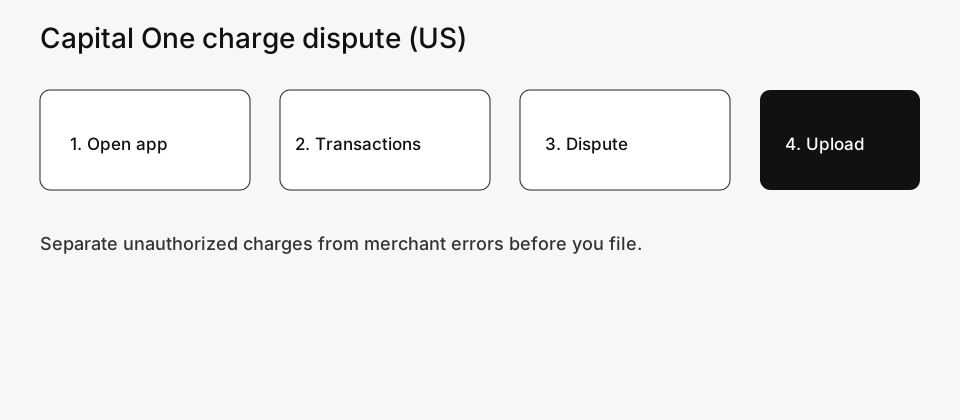
- Sign in to the Capital One app or capitalone.com.
- Open the card account → Transactions / Activity.
- Select the charge → choose Dispute / Report a problem (wording varies).
- Pick one accurate reason (fraud vs merchant error vs not received).
- Write a short timeline: purchase date, what you expected, what happened, what you already asked the merchant.
- Upload evidence before any on-screen deadline. Save the case / reference number.
Evidence checklist that actually helps
- Statement screenshot with the exact amount and descriptor.
- Order confirmation, cancel confirmation, or return tracking.
- Merchant chat/email with dates (and any “we will refund” promise).
- One-page timeline: date charged → when you contacted merchant → when you filed with Capital One.
- For fraud: note when you locked the card / changed password if you did.
Unauthorized vs merchant dispute
- Unauthorized: You did not make or approve the charge. Report quickly, secure the account, and follow Capital One’s fraud prompts.
- Merchant problem: You authorized a purchase but something went wrong (never shipped, canceled but billed, wrong amount). Contact the merchant briefly for a paper trail, but do not miss Capital One’s dispute window waiting on silence.
While the Capital One chargeback / dispute is open
- Watch for requests for more documents — reply on the same case ID.
- Keep paying amounts you are not disputing so late fees do not pile up.
- If the merchant refunds later, tell Capital One so the case can be updated.
- Provisional credit (if given) can reverse if the final decision goes against you — keep confirmations through the next statements.
Deadlines and parallel tracks
Merchant refund windows and card dispute windows are different clocks. Put the earliest hard deadline on your calendar with a buffer. Do not freeze a valid Capital One dispute because a merchant said “7–10 business days” with no case number.
Capital One charge dispute (US): exact steps. Dispute a Capital One credit card charge in the US: where to tap in the app, documents to keep, and what to expect while the case is open.
FAQ
How do I do a Capital One chargeback?
In practice you start a dispute on the transaction in the Capital One app or site, choose the reason, and upload proof. “Chargeback” is the bank/network process behind that dispute.
How do I dispute a Capital One charge?
Find the transaction → Dispute → reason → evidence → submit. Track the case ID and any document deadlines.
Do I still pay the bill during a dispute?
Yes for undisputed amounts. Ask Capital One how the disputed line is treated on your statement so you do not underpay by mistake.
What proof should I upload?
Statement line, cancel/return proof, merchant messages, tracking, and a dated timeline. One clear packet beats many angry chats.
Should I call the merchant first?
For merchant errors, a short written ask helps. For clear fraud, prioritize Capital One’s unauthorized flow and securing the card.
Written for US searches: capital one chargeback, capital one charge dispute.
Related guides
- American Express charge dispute (US)
- Capital One charge dispute (US)
- PayPal purchase dispute (US)
- Cancel PayPal automatic payments
- Dispute a credit card charge (US)
Official reference: Capital One.
Related guides on Complaintpage
Also see: Capital One credit cards help.
Evidence Capital One usually wants
Upload clear files, not a wall of text:
- Statement line — merchant name as it posts, amount, date.
- What you ordered — confirmation, receipt, or chat with the seller.
- Problem proof — tracking that never moves, return denial, cancel confirmation they ignored, or fraud alert.
- Your ask — refund, removal, or credit — one sentence.
App / website path (US)
Capital One app or site → the card → transactions → the charge → dispute / report a problem → choose the closest reason → attach evidence → submit. Keep the case number. Do not open a second dispute on the same charge while the first is open.
While the case is open
- Watch for provisional credit — it can reverse if the merchant wins.
- Answer Capital One messages inside the same case within their deadline.
- If the merchant refunds you directly, tell Capital One so they do not double-pay.
United States — practical steps for “Capital One Charge Dispute (US) — App Steps & Evidence”. Not legal advice; menus change.
Save proof before you argue — support chats disappear from screens.
Step-by-step for this service in United States
- Sign in with the email tied to the charge (check spam for receipts).
- Open billing / membership / dispute and follow labels for this service.
- Choose a reason that matches facts — unauthorized, cancelled still billed, not received, etc.
- Confirm, then capture the success screen and any case ID.
- Note the next renewal or decision date on your calendar.
- Match the statement descriptor to the correct merchant before escalating.
Find the payment channel for this service
If Apple, Google Play, PayPal, or a partner billed you, finish there too.
iPhone path: Settings → your name → Subscriptions. Google Play: profile → Payments & subscriptions. PayPal: Settings → Payments → Automatic payments. Carrier or retail bundles need the partner login.
If you only deleted the app, billing usually continues.
this service dispute deadline United States
Re-open every possible biller. Send a short timeline (dates, amounts, case IDs) once — not five emotional essays. Skip cold-call “refund recovery” companies.
For this service in United States, compare the statement amount to mail receipts before you dispute the wrong merchant.
credit card chargeback this service United States
Searchers asking “credit card chargeback this service United States” usually need the same proof: dated cancel or claim, statement line, and the correct biller. For this service in United States, finish the official path first, then escalate with a one-page timeline.
this service statement descriptor unknown
Searchers asking “this service statement descriptor unknown” usually need the same proof: dated cancel or claim, statement line, and the correct biller. For this service in United States, finish the official path first, then escalate with a one-page timeline.
Done-when list
- Correct billing channel handled
- Confirmation saved
- Next date noted
- Apple/Google/PayPal checked
- Timeline ready if escalating in United States
Timelines you should calendar
Access often continues until the paid period ends. Bank disputes have filing windows. Marketplace cases have reply clocks. Put the earliest hard deadline on your phone.
dispute while this service refund pending
Searchers asking “dispute while this service refund pending” usually need the same proof: dated cancel or claim, statement line, and the correct biller. For this service in United States, finish the official path first, then escalate with a one-page timeline.
Weird statement descriptors
Processors rename brands. Search mail for the charge amount and date, then match this service receipts before you open a dispute.
What usually wastes seven days
- Deleting the app and assuming billing stopped
- Accepting a vague chat promise without a case ID
- Skipping screenshots of the cancel screen
unauthorized this service charge United States
Searchers asking “unauthorized this service charge United States” usually need the same proof: dated cancel or claim, statement line, and the correct biller. For this service in United States, finish the official path first, then escalate with a one-page timeline.
bank rejected this service dispute next steps
For the query “bank rejected this service dispute next steps”, finish the official this service path in United States first. If that fails, escalate with proof (confirmation email, statement line, case ID) and a dated timeline.
Match the statement descriptor to the correct merchant before escalating.
merchant claim vs bank dispute this service
Searchers asking “merchant claim vs bank dispute this service” usually need the same proof: dated cancel or claim, statement line, and the correct biller. For this service in United States, finish the official path first, then escalate with a one-page timeline.
debit card dispute this service United States
Searchers asking “debit card dispute this service United States” usually need the same proof: dated cancel or claim, statement line, and the correct biller. For this service in United States, finish the official path first, then escalate with a one-page timeline.
Order of operations if they refuse
- Official this service path with confirmation
- Marketplace / PayPal buyer protection if eligible
- Card or bank dispute with uploads
- CFPB complaint portal and your state AG consumer page
win this service dispute evidence checklist
For the query “win this service dispute evidence checklist”, finish the official this service path in United States first. If that fails, escalate with proof (confirmation email, statement line, case ID) and a dated timeline.
Match the statement descriptor to the correct merchant before escalating.
documents for this service dispute United States
Match the statement descriptor to the correct merchant before escalating.
Write one paragraph: what you bought, when you cancelled, what still charged, what you want (stop renewals / refund / both).
How partner bundles confuse the cancel button (this service)
Mobile carriers, retail memberships, and streaming bundles bill under a partner name. Cancel inside the partner account, then verify this service no longer lists an active paid plan.
Sample message you can send once (this service)
Old iPads and work phones hide second Apple IDs. Open Settings on each device. Search Gmail/Outlook for “your receipt from” plus this service. PayPal automatic payments are a third place people forget.
CFPB or local regulator after this service
For the query “CFPB or local regulator after this service”, finish the official this service path in United States first. If that fails, escalate with proof (confirmation email, statement line, case ID) and a dated timeline.
Match the statement descriptor to the correct merchant before escalating.
ACH unauthorized debit United States
For the query “ACH unauthorized debit United States”, finish the official this service path in United States first. If that fails, escalate with proof (confirmation email, statement line, case ID) and a dated timeline.
Match the statement descriptor to the correct merchant before escalating.
provisional credit after this service dispute
Searchers asking “provisional credit after this service dispute” usually need the same proof: dated cancel or claim, statement line, and the correct biller. For this service in United States, finish the official path first, then escalate with a one-page timeline.
Second charge showed up — next moves
Check for a second subscription under another email. Check Apple/Google/PayPal again. Ask the merchant for a written cancel confirmation. If money keeps leaving, use your card issuer dispute / provisional credit rules with the evidence packet.
When a free trial quietly converted (this service)
Pending often means the merchant accepted a request but money has not moved. Processing can mean the bank is investigating. Neither is a final win — watch for reversals and keep the case number.
fraud freeze card then dispute this service
For the query “fraud freeze card then dispute this service”, finish the official this service path in United States first. If that fails, escalate with proof (confirmation email, statement line, case ID) and a dated timeline.
Match the statement descriptor to the correct merchant before escalating.
temporary credit then reversed this service
For the query “temporary credit then reversed this service”, finish the official this service path in United States first. If that fails, escalate with proof (confirmation email, statement line, case ID) and a dated timeline.
Match the statement descriptor to the correct merchant before escalating.
How to write a one-page timeline (this service)
List dates down the left: signup or purchase, cancel attempt, each charge, each support reply. Add amounts and case IDs. Banks and regulators skim this faster than a long story.
Attach the timeline as page one of your PDF upload.
United States consumer angles that help
cooling-off is limited; focus on merchant policy + bank windows
If the merchant process fails, look at CFPB complaint portal and your state AG consumer page and keep copies of every reply.
If you have two Apple IDs or two emails (this service)
Many subscriptions keep working until the paid period ends. That is normal. Your checklist is: renewals off, end date known, no surprise second plan.
Paper trail for this service in United States
- Confirmation email, statement line, case ID
- Email search: brand name + exact amount
- Chat export or ticket number
- Photos / tracking for returns
- Screenshot of the statement descriptor
- Cancel or claim confirmation page
FAQ for this service in United States
Should I call the merchant first?
For quality/refund issues, yes — unless it is clear fraud; then freeze the card.
What is provisional credit?
Temporary money while the bank investigates — it can reverse if you lose.
Debit vs credit?
Windows and protections differ; file as soon as you notice the charge.
Bank wants more documents.
Send one PDF: timeline, screenshots, cancel proof, statement highlight.
Merchant already refunded.
Watch for double recovery; tell the bank if a refund posts.
Shared seats and organizer rights
Only the purchaser or plan owner can usually cancel. Tell household members before you cut renewals so nobody loses access mid-month without warning.
What “pending” and “processing” usually mean (this service)
Stopping renewals prevents the next charge. A refund asks money back for a past charge. Say which outcome you want. Many chats fail because the agent only toggles renewals while you expected cash back.
Top US billing & dispute guides
Start here if Google sent you for a specific problem — these are the current priority pages:
Related guides
- Rakuten Cash Back Missing? Track Order & Fix It (US)
- Dispute an Amex Charge Online (US) — Steps & Deadlines
- Open a PayPal Purchase Dispute (US) — Resolution Center
- Cancel PayPal Automatic Payments (US) — Stop Recurring
- Cancel Spotify Premium (US) — App, Apple & Google Play
- Cancel Netflix (US) — Keep Profile Data, Stop Billing
- Amazon A-to-z Claim (US) — When & How to File
- Cancel Amazon Prime (US) — Membership Settings Path
- Phone Insurance Claim (US) — Carrier Device Protection
- Cancel Disney+ Ireland — Web, iPhone & Google Play
- Hotel Overcharge or Wrong Rate — How to Complain (Ireland)
- Dispute a Credit Card Charge (US) — Bank Steps
- Stop Bank Autopay (US) — ACH & Bill Pay Off
Not Capital One? Other US billing paths
Capital One’s app dispute is not a Regulation Z chargeback by itself. If the posting bank is Amex or an ACH pull, switch guides instead of copying these taps.